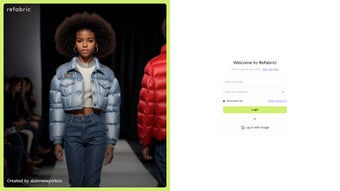

Download Refabric – AI Fashion Design Assistant, Free & Secure Tool for Designers
Overview
Refabric AI Fashion Design Assistant is a next‑generation software that blends generative artificial intelligence with the creative workflow of fashion designers. Whether you are an established design house, an emerging talent, or part of a collaborative studio, Refabric accelerates concept development by turning a brief into multiple, market‑ready silhouettes, colour palettes and fabric suggestions in seconds. The platform continuously scans millions of runway images, historic collections and real‑time social‑media trends, feeding the AI model with up‑to‑date visual intelligence.
This ensures every generated idea is both forward‑thinking and commercially viable. Refabric runs on Windows, macOS, iOS and Android, offering a free tier that includes core AI generation, basic trend insights and up to five exports per month. Premium upgrades unlock unlimited exports, advanced fabric simulation and priority cloud processing, making the tool adaptable for freelancers, students and large enterprises alike.
Security is baked into the architecture: all data is encrypted in transit (TLS 1.3) and at rest (AES‑256), and GDPR‑compliant controls protect your intellectual property. In short, Refabric provides a secure, constantly updated environment where designers can experiment without the traditional constraints of sketch‑and‑sew, delivering a faster, more innovative design pipeline.
Key Features, Compatibility & Pros / Cons
- Generative Design Engine: Produce dozens of design concepts from a single brief, with variations in silhouette, fabric, and detailing.
- Trend Intelligence Dashboard: Real‑time analytics pull data from global runway shows, social platforms and consumer sentiment.
- Smart Fabric Simulation: Visualise drape, texture and sheen on virtual models without physical samples.
- Collaborative Cloud Workspace: Securely share projects, comment, edit and version‑control designs with teammates.
- One‑Click Export: Export to Adobe Illustrator, Photoshop, PNG, SVG, PDF or industry‑standard CAD formats.
- Custom Style Prompts: Feed mood boards, colour libraries or historic references to guide the AI.
- Automatic Secure Updates: AI models and feature sets are refreshed automatically, keeping the tool current.
Refabric is native to Windows 10/11 (64‑bit) and macOS Monterey or later, while mobile apps support iOS 14+ and Android 9+. Desktop versions leverage GPU acceleration for rapid AI rendering; the mobile versions are optimized for ARM processors, delivering near‑instant suggestions on tablets and smartphones. Because the heavy AI processing occurs on Refabric’s secure cloud servers, even low‑spec devices can generate concepts quickly, ensuring seamless continuity across a MacBook in the studio, an iPad on the runway and a Windows PC back at the office.
Pros
- Instant generation of multiple concepts dramatically reduces sketch time.
- Real‑time trend data keeps collections relevant and market‑ready.
- Secure cloud storage protects design IP and complies with GDPR.
- Cross‑platform availability lets you work on any device you prefer.
- Generous free tier makes the tool accessible to students and freelancers.
Cons
- Advanced simulation, unlimited exports and priority processing require a paid subscription.
- AI suggestions can feel generic if the initial brief lacks detail.
- Continuous internet connection is needed for cloud‑based processing.
- Designers unfamiliar with AI may experience an initial learning curve.
- Integration is limited to major Adobe and CAD formats; niche tools are not yet supported.
Installation, Usage & Frequently Asked Questions
Getting started with Refabric is straightforward. Visit the official Refabric website, select the “Download” button that matches your operating system, and the digitally signed installer begins downloading. After saving the file, run the installer; a guided wizard walks you through license acceptance, installation folder selection and shortcut creation. Once installed, launch Refabric and register using an email address or single‑sign‑on via Google or Apple ID—both methods employ OAuth 2.0 encryption for added security.
Upon first launch, an interactive onboarding tutorial walks you through creating a new project, entering a design brief and choosing an AI assistance level (Basic, Creative, Experimental). Within 30–45 seconds the engine presents a gallery of concepts. Each concept can be refined using sliders for silhouette complexity, fabric weight, colour intensity, or by uploading reference images that the prompt‑engineering system incorporates into the next iteration.
The collaborative workspace lets you invite teammates by email, assigning view‑only or edit permissions. All changes are saved automatically to the cloud, and a version‑history panel allows you to revert to any previous state. Export options appear in the top‑right corner, supporting PNG, JPEG, SVG, PDF and CAD formats such as .cadd and .dwg.
Regular automatic updates keep the AI models fresh without requiring manual patches.
Is Refabric completely free?
Refabric offers a free tier that includes core AI generation, basic trend insights and up to five exports per month. Premium subscriptions unlock unlimited exports, advanced fabric simulation and priority cloud processing.
Can I run Refabric on a low‑spec laptop?
Yes. While GPU‑accelerated machines render faster, the cloud‑based AI ensures that even low‑spec devices can generate concepts quickly because the heavy computation occurs on Refabric’s servers.
How does Refabric protect my design intellectual property?
All project data is encrypted in transit (TLS 1.3) and at rest (AES‑256). Private cloud workspaces use role‑based access controls, ensuring only invited collaborators can view or edit your designs.
What export formats are supported?
Refabric supports PNG, JPEG, SVG, PDF and industry‑standard CAD formats such as .cadd and .dwg. Export options are accessible directly from the project gallery.
Is customer support available for free‑tier users?
Free‑tier users can access a comprehensive knowledge base, community forums and weekly webinars. Premium subscribers receive 24/7 live chat and priority email support.
Conclusion – Download Refabric and Transform Your Design Process
Refabric AI Fashion Design Assistant stands out as a secure, constantly updated tool that reshapes how designers generate concepts, validate trends and collaborate across teams. Its generative engine, combined with real‑time trend analytics and cross‑platform support, delivers a workflow that is faster, more flexible and more innovative than traditional sketch‑and‑sew methods. While premium features require a subscription, the free tier offers sufficient capability for students, freelancers and small studios to experiment and produce professional‑grade concepts without upfront cost. By protecting your IP with robust encryption and providing seamless cloud collaboration, Refabric lets you focus on creativity rather than technical limitations. If you’re ready to reduce manual sketch time, stay ahead of market trends and protect your designs, click the download button below, install Refabric on your preferred device, and start exploring limitless fashion possibilities today.
Pros: rapid AI generation, cross‑platform, secure cloud, generous free tier.
Cons: premium cost for advanced features, reliance on internet connectivity.



.png)



